Integration
Integration
1.while executing the following command elastic search will display the elastic search all details
curl -X GET localhost:9200
{
  "name" : "my-node",
  "cluster_name" : "my-cluster",
  "cluster_uuid" : "hVcYhtKCQmWo5wVT_pi0Zw",
  "version" : {
    "number" : "7.17.18",
    "build_flavor" : "default",
    "build_type" : "rpm",
    "build_hash" : "8682172c2130b9a411b1bd5ff37c9792367de6b0",
    "build_date" : "2024-02-02T12:04:59.691750271Z",
    "build_snapshot" : false,
    "lucene_version" : "8.11.1",
    "minimum_wire_compatibility_version" : "6.8.0",
    "minimum_index_compatibility_version" : "6.0.0-beta1"
  },
  "tagline" : "You Know, for Search"
}
-
From above details our node site will verify the cluster name and cluster uuid Elastic search will automatically integrate with our node site.
-
If we want to enable this from our node site need follow the below steps
-
Click on site menu
-
Click on Manage site and click on three dots and click on edit the site details will be appeared as shown below.
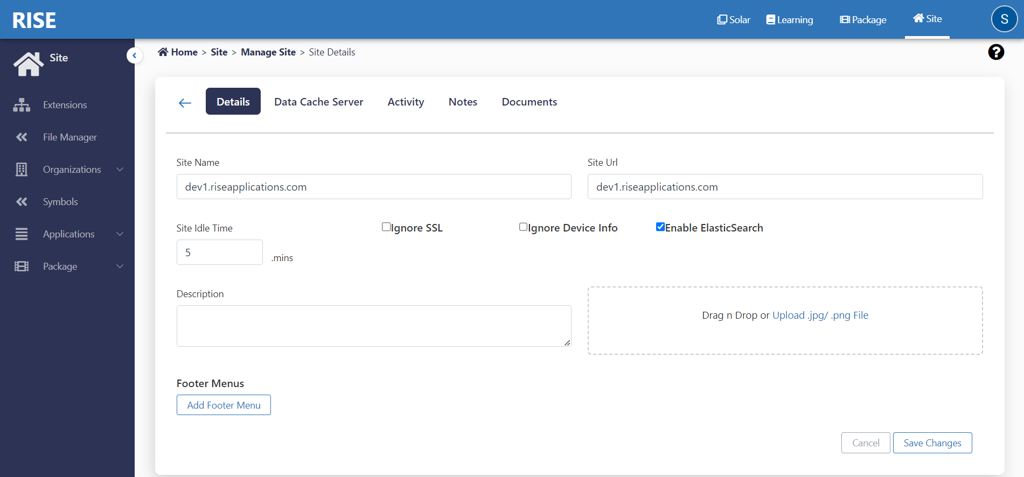 6. Please select the Enable ElasticSearch option and click on save Changes it will provide the integration between Elastic Search and Nodesite.