ChatBot
Automation Chatbot Overview
The Automation Chatbot in DPL Studio is an AI-powered assistant designed to simplify Data Pack development and automation tasks. It helps users understand Data Pack configurations, troubleshoot issues, and obtain guidance related to workflows, transformations, connectors, and deployment processes.
The chatbot analyzes the active Data Pack and provides context-aware responses based on its configuration and structure.
Accessing the Chatbot
The chatbot is available within the Automation tab of DPL Studio. It is integrated directly into the Automation workspace, allowing users to interact with the assistant while creating, editing, and managing Data Packs.
The chatbot can:
-
Interpret user requests and questions
-
Provide recommendations and best practices
-
Assist with troubleshooting and configuration issues
-
Explain Data Pack components and workflow logic
Working with Data Packs
When a Data Pack is created or opened in DPL Studio, the chatbot automatically analyzes the pack configuration.
The chatbot can access and understand:
-
Metadata definitions
-
Data transformations
-
Schema mappings
-
Workflow configurations
-
Connector settings
-
Deployment configurations
This enables the chatbot to provide responses that are specific to the active Data Pack.
How It Works
-
Open or create a Data Pack in DPL Studio.
-
The chatbot automatically indexes the Data Pack configuration.
-
Enter a question or request in the chatbot interface.
-
The chatbot analyzes the Data Pack context and generates a relevant response.
Examples of supported questions include
-
"Explain the mapping logic used in this Data Pack."
-
"Why is my Azure upload failing?"
-
"What transformations are applied to this dataset?"
-
"How can I optimize this workflow?"
Features Technical Query Resolution
The chatbot can provide technical information related to the active Data Pack, including:
- Explanation of transformation functions and parameters,
- Connector configuration details,
- Schema mapping information,
- Data validation rules and processing logic
Automation Assistance
The chatbot can assist with workflow design and automation tasks by:
-
Recommending workflow optimizations
-
Suggesting automation best practices
-
Providing step-by-step implementation guidance
-
Offering error-handling recommendations
Real-Time Troubleshooting
The chatbot can help identify and resolve common issues, including:
-
Missing or incomplete configurations
-
Metadata inconsistencies
-
Connector-related issues
-
Build and deployment errors
-
Workflow execution problems
The chatbot also suggests possible solutions based on the detected issue.
Example Workflow
A chatbot is a that understands user input and responds automatically, like querry related to packs.
- User sends a message
- Chatbot processes it (using rules or AI)
- Generates a response
- Sends reply back instantly
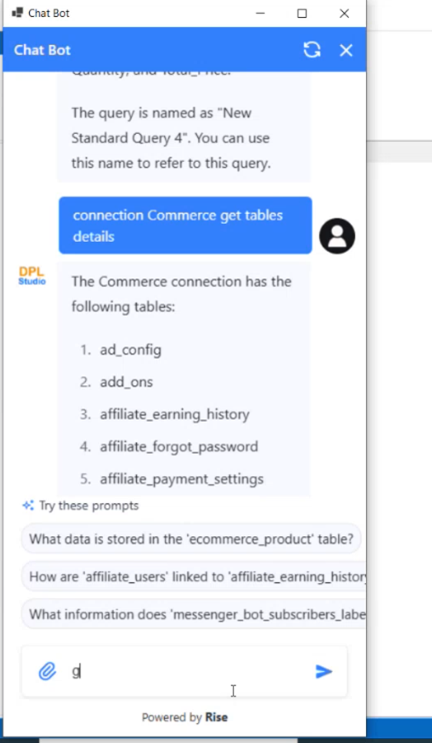
Use case
- Generate the Packs using the Prompt
- Customize the Querry by using the Prompt